Running a successful Shopify store in 2026 requires more than great products and marketing. It requires accurate financial records, clean bookkeeping, and reliable reporting. Without proper accounting systems, even profitable online sellers can lose money through tax mistakes, cash flow issues, and poor financial visibility.
One of the most important steps you can take as an ecommerce seller is learning how to connect QuickBooks to Shopify correctly. When done properly, this integration automates your bookkeeping, tracks every sale, and gives you real time insight into your business performance.
In this complete guide, we will walk you through exactly how to connect QuickBooks to Shopify, avoid common mistakes, and set up an accounting system that supports long term growth.
Why Shopify and QuickBooks Integration Matters in 2026
Shopify continues to dominate the ecommerce space, while QuickBooks remains the most widely used accounting platform for small and mid sized businesses. When these two systems work together, your business gains a powerful financial foundation.
Connecting Shopify to QuickBooks allows you to:
- Automatically record sales and refunds
- Track Shopify fees and payment processing costs
- Reconcile payouts accurately
- Monitor profit margins
- Prepare for taxes with confidence
- Eliminate manual data entry
Without proper integration, many sellers rely on spreadsheets or incomplete reports. This often leads to inaccurate tax filings, missed deductions, and financial confusion.
Common Problems Without Shopify QuickBooks Integration
Many online sellers experience:
- Duplicate income entries
- Missing transaction records
- Unreconciled bank deposits
- Incorrect sales tax reporting
- Confusing payout statements
- Unclear profit margins
A proper QuickBooks Shopify integration solves these problems at the source.
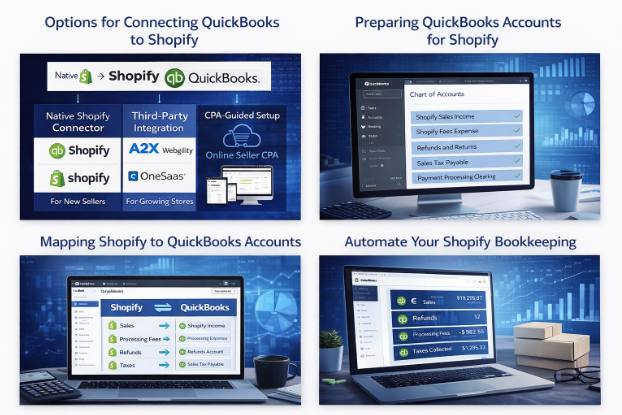
Step 1: Choose the Right Integration Method
Native Shopify QuickBooks Connector
Best for new sellers and low volume stores.
Third Party Integration Tools
Best for high volume and scaling businesses.
CPA Guided Custom Setup
Best for advanced sellers and long term growth.
Professional configuration ensures your books are built correctly from day one.
Step 2: Prepare Your QuickBooks Account
Before connecting Shopify, make sure your QuickBooks account includes:
- Shopify Sales Income
- Shopify Fees Expense
- Refunds and Returns
- Sales Tax Payable
- Payment Clearing Accounts
This structure prevents misclassification and reporting errors.
Step 3: Install the Integration App
- Log into QuickBooks Online
- Visit the App Store
- Search for Shopify integration
- Install the app
- Grant permissions
Step 4: Connect Your Shopify Store
Authorize your Shopify account and confirm data access. The integration will begin syncing order and payout information.
Step 5: Map Your Accounts Correctly
Map the following carefully:
Sales → Shopify Income
Fees → Processing Expenses
Refunds → Returns Account
Taxes → Sales Tax Payable
Proper mapping ensures clean financial statements.
Step 6: Set Up Payout Reconciliation
Shopify groups transactions into payouts. Your integration must match these deposits with orders and fees.
This is essential for accurate bookkeeping.
Step 7: Automate Your Sync Schedule
Best practice:
- Daily syncing
- Weekly review
- Monthly reconciliation
Automation keeps your records accurate year round.
Automating Shopify Accounting With QuickBooks
A properly configured system automates:
- Revenue tracking
- Fee categorization
- Refund processing
- Tax reporting
- Bank matching
- Inventory valuation
This saves time and reduces costly mistakes.
Best Practices for Shopify Bookkeeping in 2026
- Reconcile monthly
- Review payout reports
- Track chargebacks
- Monitor inventory costs
- Validate tax records
- Keep documentation
Strong bookkeeping supports growth and compliance.
Common Shopify QuickBooks Integration Mistakes
Avoid:
- Using one income account
- Skipping reconciliation
- Ignoring clearing accounts
- Poor tax setup
- Mixing funds
- Not reviewing sync errors
These issues compound over time.
When to Hire an Ecommerce CPA
Consider professional help if:
- Revenue exceeds $250,000
- You sell on multiple platforms
- You operate internationally
- You plan to scale
- You want tax optimization
TheOnlineSellerCPA provides:
- Shopify QuickBooks setup
- Custom chart of accounts
- Integration management
- Monthly bookkeeping
- Tax planning
- Financial reporting
Our goal is to give online sellers clarity and control.
Conclusion
Connecting QuickBooks to Shopify in 2026 is one of the smartest financial decisions an online seller can make. Proper integration delivers accurate records, automated workflows, and reliable financial insight.
With the right system in place, you can focus on growth instead of bookkeeping.
Frequently Asked Questions
How do I connect QuickBooks to Shopify?
Use a native connector, third party app, or CPA managed setup to sync sales, fees, and payouts.
Does QuickBooks work with Shopify?
Yes. QuickBooks Online integrates with Shopify using approved tools and connectors.
What is the best Shopify QuickBooks integration in 2026?
A2X and Webgility are popular for advanced sellers. Smaller stores may use native tools.
Can QuickBooks track Shopify payouts?
Yes, with proper configuration and payout matching.
How often should Shopify sync with QuickBooks?
Daily syncing is recommended.
Do I need an accountant?
Complex businesses benefit from professional setup.
Will inventory sync?
Some tools support inventory syncing. Advanced setups may be required.
How do I fix sync errors?
Correct mapping, reauthorization, and tax settings usually resolve issues.
Get Expert Help With Your Shopify Accounting
If you want your Shopify and QuickBooks integration set up correctly the first time, TheOnlineSellerCPA is here to help.
 Email: Info@theonlinesellercpa.com
 Call: 305 767 7408
 Website: https://theonlinesellercpa.com/
Schedule a consultation today and take control of your ecommerce finances.